Teyvat PaletteTeyvat colour cards
Scene library
GitHub
Gallery
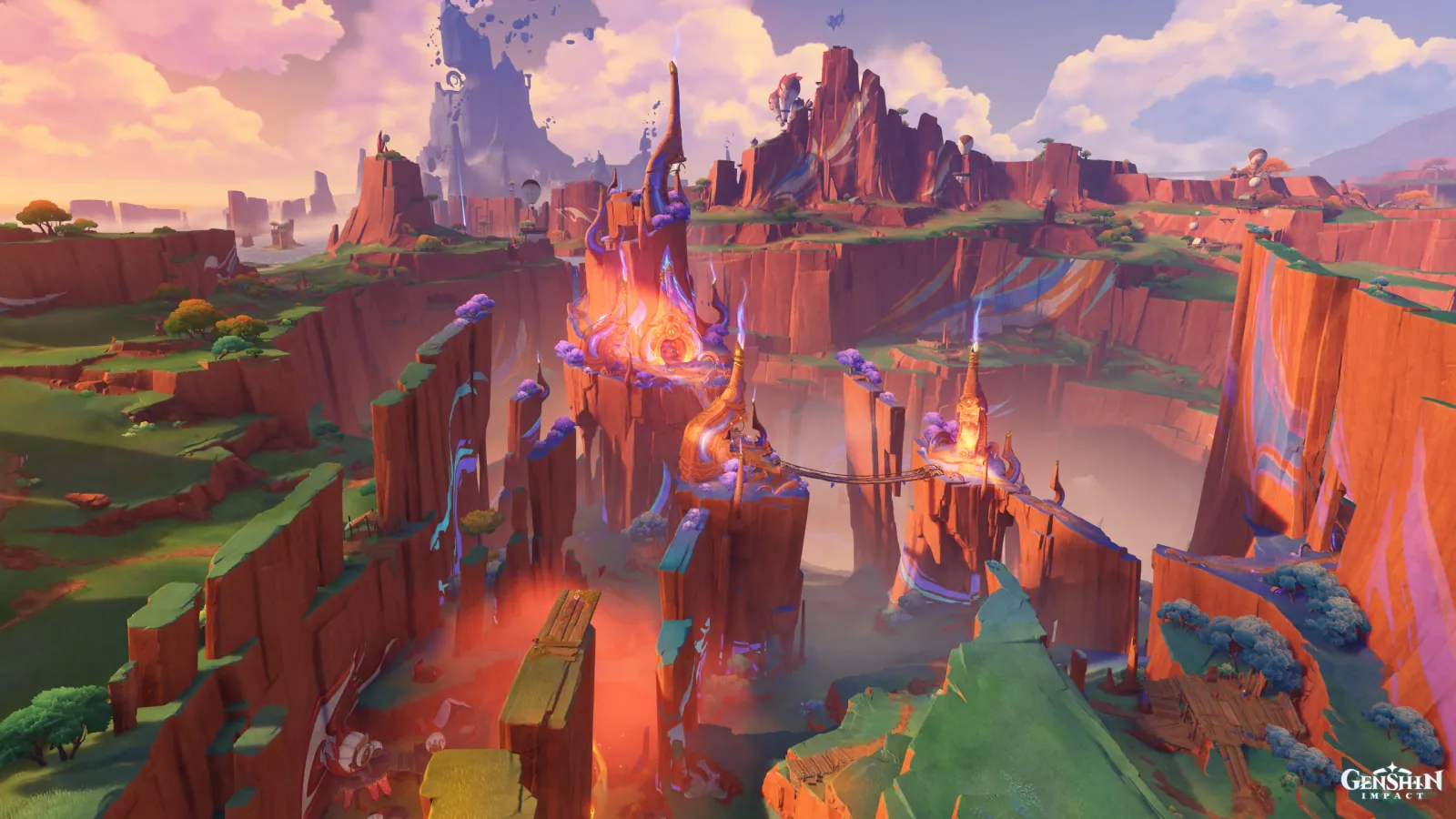
Tezcatepetonco Range in Afterglow
NatlanDuskVastWarmLayered

Tezcatepetonco Range in Afterglow

Palette

Click a swatch to copy its HEX; hover for the OKLCH value.

Reconstructed gradient

The gradient distilled from the scene, unrolled left to right by stop; the authored angle is 170° (used by the hero and exports), while gallery cards share a uniform 135° sweep.

0%f0aea413%d3bbd333%9180a758%97566080%524320100%c05444

Why it works

Pressing the median down does not require grey: Tezcatepetonco Range is only 4.99% achromatic, seven hue bands above 1% cover 94.66% of it, and the quota is still 0.100 (p99 0.172 minus median 0.072) — because what holds the median down is large areas that are coloured but pale: the 11.53% violet canopy at chroma 0.060, the red sandstone walls at 0.087, the mesa turf at 0.055. Whatever grey can save, pale colour saves too, and it saves it without handing over the picture's identity.

01

Pale is another kind of grey

The frame is only 4.99% achromatic, yet the whole central gorge (20%–80% across, 30%–60% down) measures a chroma of just 0.084, while the peak inside that same rectangle is 0.207. Three things carrying half the picture hold that 0.084 up: the red sandstone walls at L 0.53 / 0.087, the violet canopy along the clifftops (270°–330°, 106,285 pixels = 11.53%) at L 0.63 / 0.060, and the mesa turf at L 0.39 / 0.055 — all of them parked near the 0.072 median. Chamber of Weaving in Dim Light, from the same batch, used 41.61% achromatic to push its median to 0.028; this picture gets to 0.072 on 4.99%, and the quotas differ by only 0.025. Holding a large surface at low chroma and bleaching it to grey do nearly the same thing to the median. The difference is that the first keeps its hue — and that hue is what this red country is.

02

Seven families cannot split one constant

Seven of the eight hue bands clear 1%, running the whole wheel from red to pink, and still the peak goes to one place only: 3,727 of the 4,000 most chromatic pixels land in 30°–60°, on that fire-lit crevice at the bottom of the gorge (measured L 0.58 / chroma 0.143 / hue 30°). Count the cold half instead and 165°–255° holds 9,273 pixels (1.01%) at a mean chroma of 0.042 and a peak of only 0.097 — less than half the 0.207 of the warm end. More hues does not mean every family can afford height. The ceiling is one number for the whole picture, not something apportioned by family — which is why adding another hue never makes an image more vivid, only its median harder to hold down.

03

Two corners of sky say where the sun is

The sky at top left measures L 0.81 / chroma 0.079 / hue 29°; at top right, L 0.82 / chroma 0.042 / hue 325°. The two corners differ by 0.01 in lightness, yet 64° in hue and nearly double in chroma — the low sun is on the left. That, not any darkening of the sky, is why this study is set at afterglow. And the same band of sky is working for the median: it is the largest surface along the top of the frame, its lightness climbs to 0.81, and its chroma is 0.042–0.079, under half the 0.207 peak. A sky lit by the setting sun looks like the most vivid thing in the frame and measures as the cheapest surface in it — so when you want warmth without richness, spend the warm on a large pale area and save the saturation for a single crevice.

Take these colours with you

CSS variables, a Tailwind v4 theme or SVG — one click to copy into your project.

/* Tezcatepetonco Range in Afterglow · Tezcatepetonco Range in Afterglow — Teyvat Palette */
:root {
  --afterglow-sky: oklch(0.81 0.079 29); /* Afterglow Sky #f0aea4 */
  --far-sky-rose: oklch(0.82 0.042 325); /* Far Sky Rose #d3bbd3 */
  --red-scarp: oklch(0.53 0.087 10); /* Red Scarp #975660 */
  --canopy-violet: oklch(0.63 0.06 305); /* Canopy Violet #9180a7 */
  --mesa-green: oklch(0.39 0.055 86); /* Mesa Green #524320 */
  --gorge-fire: oklch(0.58 0.143 30); /* Gorge Fire #c05444 */
  --gradient-tezcatepetonco-range: linear-gradient(170deg, oklch(0.81 0.079 29) 0%, oklch(0.82 0.042 325) 13%, oklch(0.63 0.06 305) 33%, oklch(0.53 0.087 10) 58%, oklch(0.39 0.055 86) 80%, oklch(0.58 0.143 30) 100%);
}

A 1080×1350 PNG carrying the scene, its palette and every value — save it and post it as is.