Teyvat PaletteTeyvat colour cards
Scene library
GitHub
Gallery
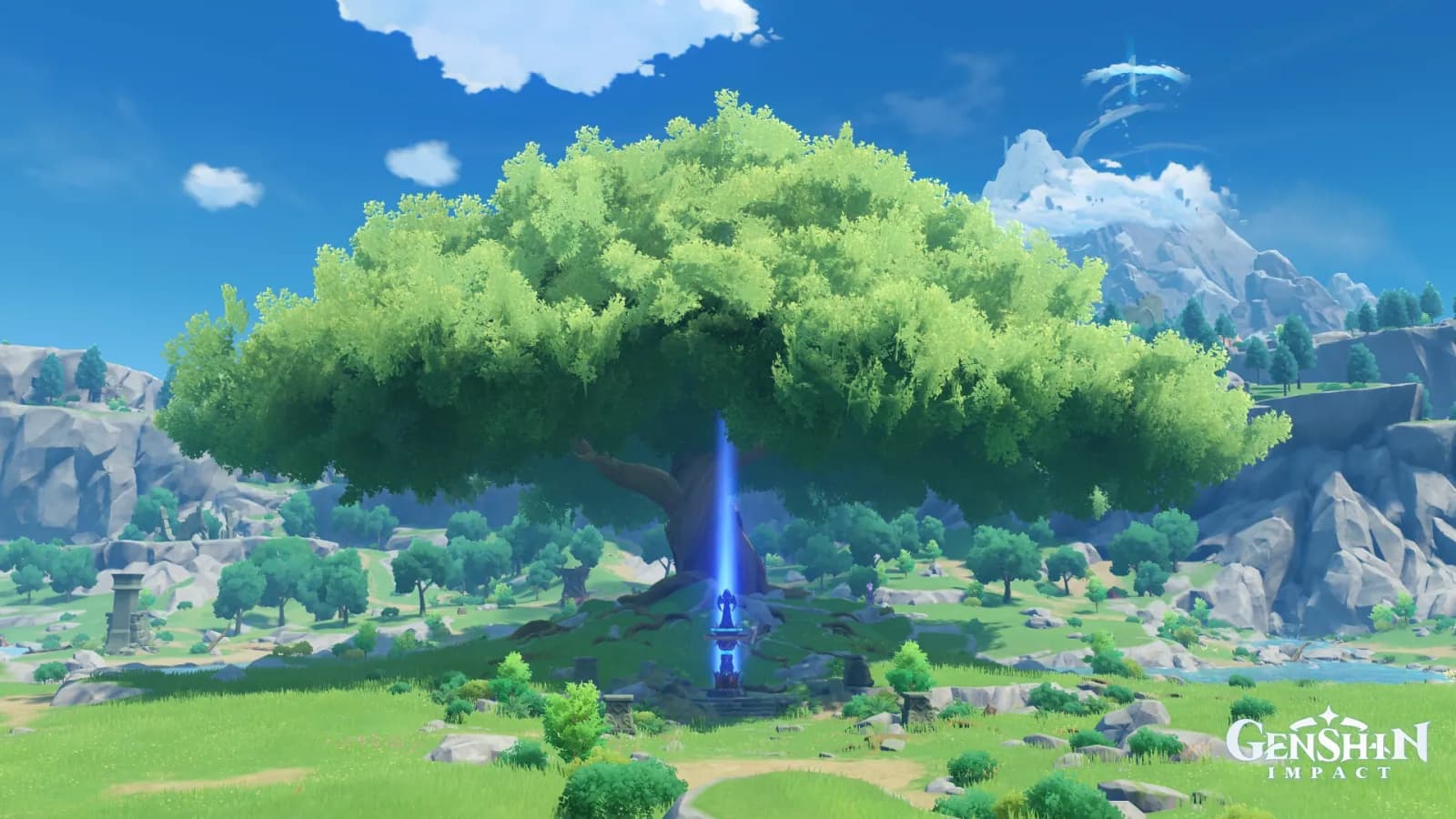
Symbol of Mondstadt's Hero at Shaded Noon
MondstadtDaySolemnShadedCommemorative

Symbol of Mondstadt's Hero at Shaded Noon

Palette

Click a swatch to copy its HEX; hover for the OKLCH value.

Reconstructed gradient

The gradient distilled from the scene, unrolled left to right by stop; the authored angle is 180° (used by the hero and exports), while gallery cards share a uniform 135° sweep.

0%468bcb20%71bc8252%18454368%3d84db100%91c26d

Why it works

The same colour appears twice in one picture, once as background and once as subject: the band of sky across the top measures 249° / chroma 0.120 / L 0.62, and the shaft of light rising from the monument under the tree measures 255° / chroma 0.150 / L 0.61 — 6°, 0.030 and 0.01 apart. What makes the shaft the subject is not in the shaft; it is in the ring pressed against it: the shaded face of the crown, L 0.36. To make a colour a focal point, don't change it first — change its neighbours.

01

The sky and the shaft are the same blue

Of the 4000 most chromatic pixels in the frame, 2655 fall in 240°–270°, centred at (0.49, 0.64), just below the middle of the picture. That is not sky; it is a single shaft rising straight from the monument beneath the tree into the crown. The vertical strip used to measure it is only 1.6% of the frame's width and reads 255° / chroma 0.150 / L 0.61; the sky spanning the top reads 249° / chroma 0.120 / L 0.62. By the numbers they are the same blue, and yet the eye treats only one of them as an event.

02

The difference is entirely in what touches it

The trunk and shadow flanking the shaft measure L 0.45 / chroma 0.063: against them the shaft is 0.16 of lightness away and 2.4 times their chroma. Hang the same blue back in the sky and only 0.01 of lightness and 1.25 times the chroma remain against its neighbour — it disappears. The five secret-space studies had to carry one asset through five environments to measure this; this picture is cheaper — the same blue occurs twice inside one frame, and it can be read without changing scenes: intensity is not a property of the colour.

03

Identical hue ledger, two different pictures

Measured side by side with «Galesong Hill in Sun and Pine Shade»: green band 33.78% against 32.33%, cyan band 16.25% against 12.08%, blue band 47.00% against 45.67% — the three hue bands match almost rung for rung, same nation and same hour, and yet one is a landscape and the other is a picture with a subject. Only the other two channels move: median lightness 0.61 against 0.70, peak chroma 0.234 against 0.175. The «Belleau Region in Limpid Daylight» set held median lightness and chroma p99 still and let area vary; this pair does the reverse, nailing area down and moving lightness and chroma instead. To give a picture a subject, don't look for the answer in the hue table.

Take these colours with you

CSS variables, a Tailwind v4 theme or SVG — one click to copy into your project.

/* Symbol of Mondstadt's Hero at Shaded Noon · Symbol of Mondstadt's Hero at Shaded Noon — Teyvat Palette */
:root {
  --noon-blue: oklch(0.62 0.12 249); /* Noon Blue #468bcb */
  --monument-shaft: oklch(0.61 0.15 255); /* Monument Shaft #3d84db */
  --sunlit-canopy: oklch(0.73 0.112 150); /* Sunlit Canopy #71bc82 */
  --canopy-underside: oklch(0.36 0.049 190); /* Canopy Underside #184543 */
  --trunk-shadow: oklch(0.45 0.063 233); /* Trunk Shadow #2e5b73 */
  --meadow-green: oklch(0.76 0.126 133); /* Meadow Green #91c26d */
  --gradient-symbol-of-mondstadts-hero: linear-gradient(180deg, oklch(0.62 0.12 249) 0%, oklch(0.73 0.112 150) 20%, oklch(0.36 0.049 190) 52%, oklch(0.61 0.15 255) 68%, oklch(0.76 0.126 133) 100%);
}

A 1080×1350 PNG carrying the scene, its palette and every value — save it and post it as is.