Teyvat PaletteTeyvat colour cards
Scene library
GitHub
Gallery
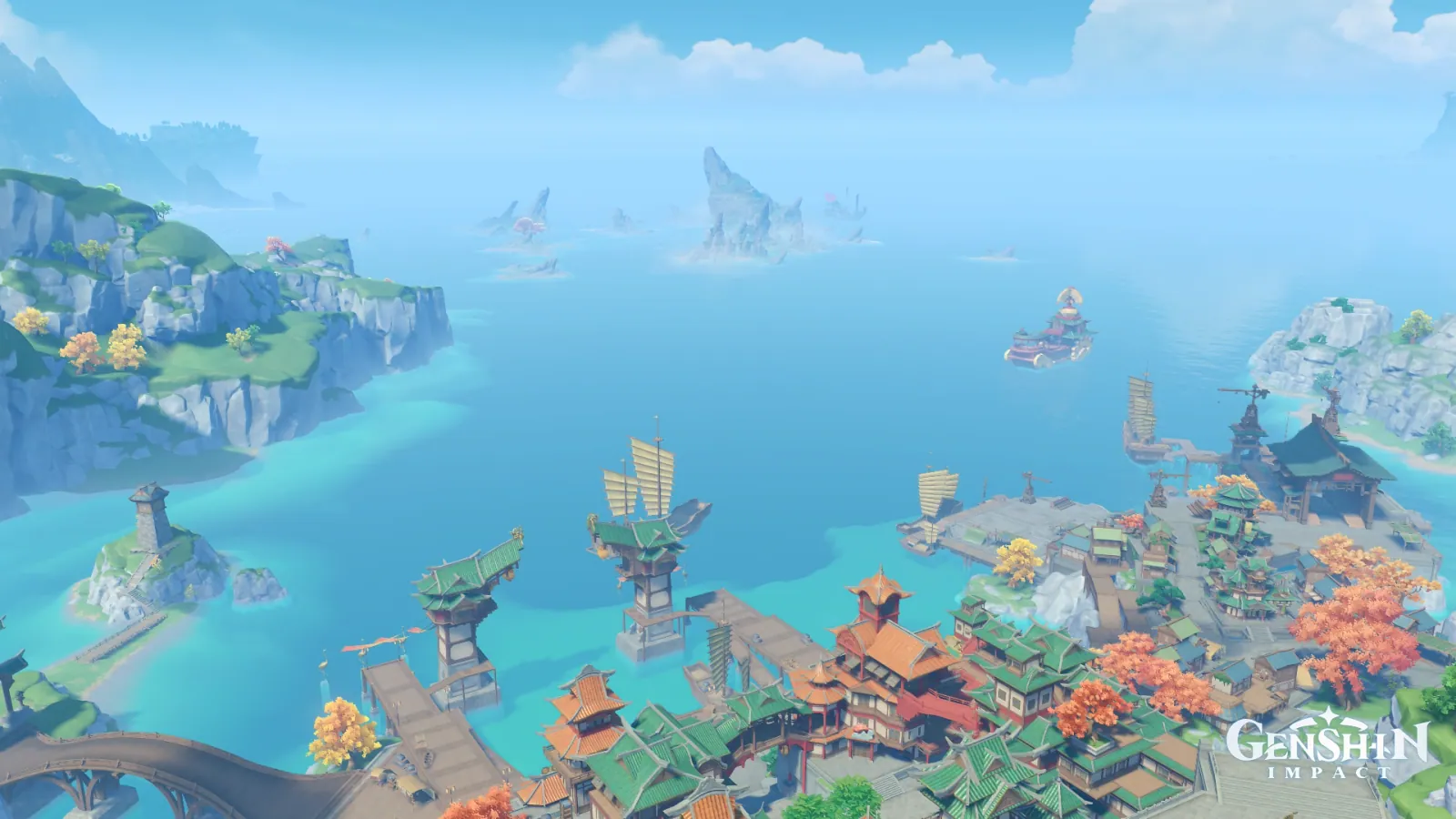
The Sea of Clouds in Far Light
LiyueDayVastBustlingFar-seeing

The Sea of Clouds in Far Light

Palette

Click a swatch to copy its HEX; hover for the OKLCH value.

Reconstructed gradient

The gradient distilled from the scene, unrolled left to right by stop; the authored angle is 180° (used by the hero and exports), while gallery cards share a uniform 135° sweep.

0%c9e2f630%7cbadc55%629fb576%67b4b2100%c6907a

Why it works

For a white to be the light, it has to move away from its neighbour's hue — or hold no hue at all. Cut its chroma in half and it is still just sky. The 4000 brightest pixels of the Sea of Clouds sit in two cells along the top edge at L 0.90 and 0.89, chroma 0.039 and 0.042, both at hue 243° — genuinely more than half off the 0.086 of the sky overhead. But 243° stands only 10° from the 233° mean of the blue band that covers 76.02% of the frame, so it is absorbed back into the sky and reads as farther away, not as light. This picture therefore has no light source, and its focus has to be earned by the bottom edge on its own.

01

The cloud is still blue

Those two cells along the top: (0.8, 0.0) holds 1884 pixels at L 0.90 / chroma 0.039, and (0.4, 0.0) holds 1209 at L 0.89 / chroma 0.042, both at hue 243°. The sky overhead — starting at (0.30, 0.00), 0.40 wide and 0.09 tall — measures L 0.80 / chroma 0.086 / 234° overall, its most saturated 3% reaching 0.102. By the caliper of 〈The Court of Fontaine in Clear Light〉, inheriting the neighbour's hue and cutting chroma to six tenths earns the name white, and this cloud cuts deeper than that. It just ends the cut 10° from the blue band's mean. The same caliper on 〈Qiongji Estuary at Noon〉 returns 4000 brightest pixels at L 0.97 / chroma 0.039–0.040, and on 〈Liyue Harbor at Midday〉 L 0.95–0.96 / chroma 0.046–0.049. All three keep colour at the top of the lightness axis, and in all three the protagonist is somewhere else.

02

The focus drops to the bottom edge

Among the frame's 4000 most chromatic pixels, the orange group holds 1310 (centroid (0.53, 0.93)), the cyan-green group 823 ((0.58, 0.98)), the red group 752 ((0.67, 0.86)) and the green group 701 ((0.59, 0.97)) — 3586 together, every centroid pressed down onto the town and its autumn trees along the bottom. Only the remaining 414 go to the open sea and the island cliff at left. This is not because the bottom is more saturated: the most saturated 3% of the upper 55% and of the lower 45% measure 0.103 and 0.111, a difference of just 0.008. What differs is hue — 238° above, 170° below. When the top of the lightness axis declines to be the light, attention has to go looking for the one patch saying something different on the hue axis.

03

Same city, same caliper

Pixels whose hue falls in 330°–90° and whose chroma reaches 0.025 number 35,241 here, 4.00% of the frame; the same window on the picture behind 〈Liyue Harbor at Midday〉 returns 31,329, or 3.56%. The two frames hold almost the same amount of warmth — and both keep colour in their skies (L 0.95 / 0.048 and L 0.90 / 0.039), so in both the protagonist is not something the sky handed over but something the warmth earned. This ruler runs both ways: drive the top toward zero and you nominate a light (Minlin 0.005, Mt. Laixin 0.021); leave it chromatic and nothing is wrong, you have simply passed the job of naming the protagonist to another axis. Never assume the brightest patch is the subject — measure how much chroma it gave up first.

Take these colours with you

CSS variables, a Tailwind v4 theme or SVG — one click to copy into your project.

/* The Sea of Clouds in Far Light · The Sea of Clouds in Far Light — Teyvat Palette */
:root {
  --cloud-rim: oklch(0.9 0.039 243); /* Cloud Rim #c9e2f6 */
  --sea-sky: oklch(0.76 0.08 233); /* Sea-and-Sky Blue #7cbadc */
  --cliff-shadow: oklch(0.67 0.071 222); /* Cliff Shadow #629fb5 */
  --shoal-jade: oklch(0.72 0.077 193); /* Shoal Jade #67b4b2 */
  --eave-vermilion: oklch(0.7 0.074 43); /* Eave Vermilion #c6907a */
  --gradient-sea-of-clouds: linear-gradient(180deg, oklch(0.9 0.039 243) 0%, oklch(0.76 0.08 233) 30%, oklch(0.67 0.071 222) 55%, oklch(0.72 0.077 193) 76%, oklch(0.7 0.074 43) 100%);
}

A 1080×1350 PNG carrying the scene, its palette and every value — save it and post it as is.