Teyvat PaletteTeyvat colour cards
Scene library
GitHub
Gallery
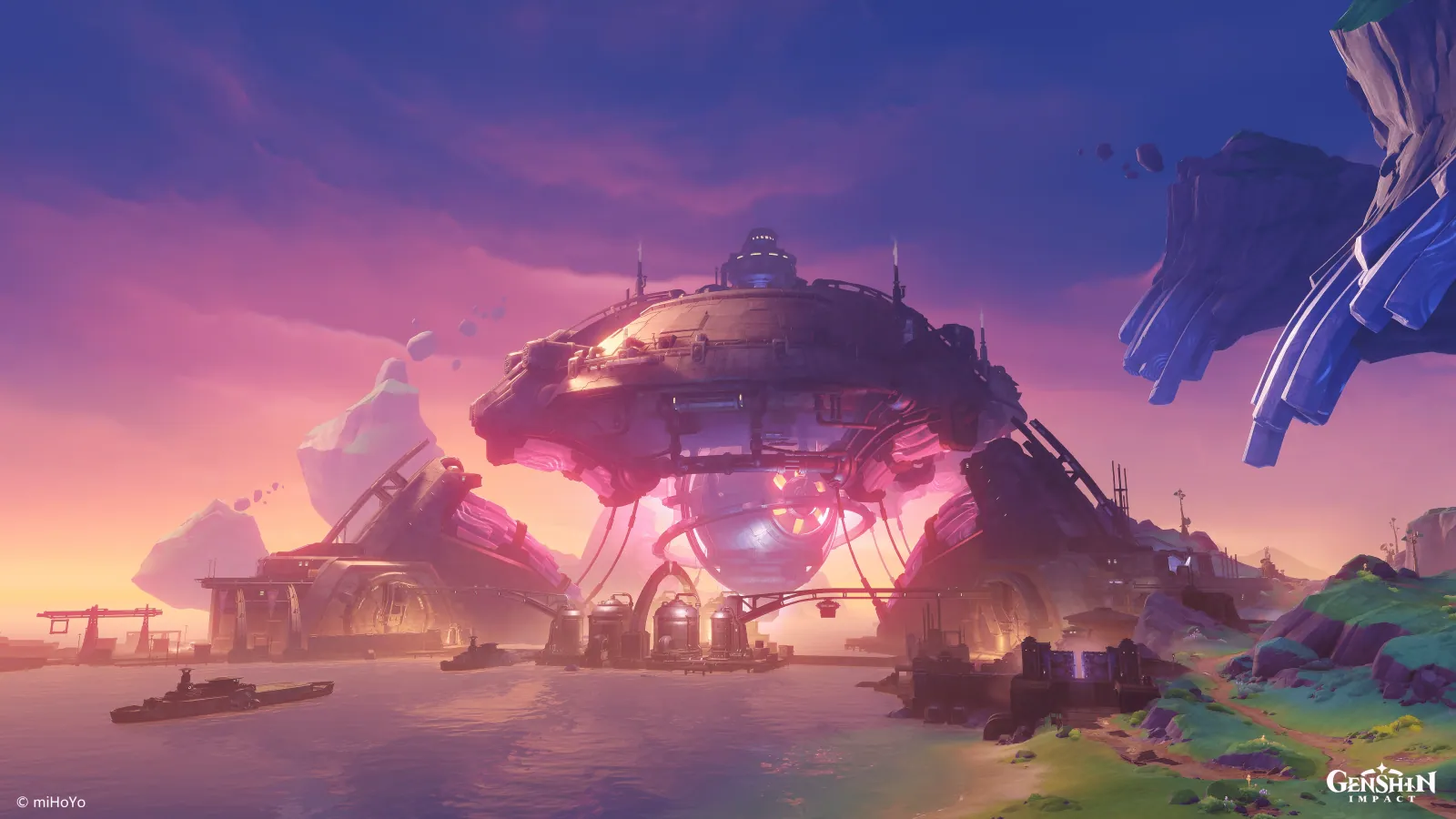
Paha Isle at Dusk Glow
Nod-KraiDuskResplendentImmenseStill

Paha Isle at Dusk Glow

Palette

Click a swatch to copy its HEX; hover for the OKLCH value.

Reconstructed gradient

The gradient distilled from the scene, unrolled left to right by stop; the authored angle is 180° (used by the hero and exports), while gallery cards share a uniform 135° sweep.

0%40438d22%684d9345%be689662%f09e9c72%fabb8f100%865a6b

Why it works

Shadow here is not black or grey mixed in — it is one step back along the dusk hue arc, toward violet. The five hue bands climb in lightness in strict step with hue: violet 286°/L 0.43, pink 331°/0.51, red 359°/0.60, orange 25°/0.69, gold 60°/0.77. The sky has drawn its own ruler for how many degrees back equal how much darker, and the shadow on the machine at the centre takes its colour off that ruler. Achromatic pixels are 0.72% of the frame.

01

The sky is a lightness ruler

Sampled top to bottom, the sky runs 278°/L 0.42 → 300°/0.48 → 348°/0.63 → 21°/0.78 → 56°/0.84, and the band census traces the same curve: five bands together are 98.23% of the frame (864,850 pixels inside the 270°→90° half of the wheel). So there is no bright violet and no dark gold in this picture — hue has stopped being an identity and become a coordinate. «Court of Fontaine at Noon» argued the same thing, but its drift was 35° inside one blue family (220° → 255°), there to keep a dark gradient from going muddy. Here the whole arc is used as the lightness axis, and even the subject's shadow picks its colour off it.

02

The machine's shadow is picked off the sky

The domed machine at the centre measures 342°/L 0.50/chroma 0.087 across the top of its shell. Round on the shaded right shoulder the hue falls back to 314° and lightness drops to 0.39, while chroma barely moves (0.083). Over the same stretch the sky runs from 337°/L 0.60 to 277°/0.42 — exactly the same direction. A dark mass holding the middle of the frame, and not one borrowed grey. Even the glow the machine emits under its belly stays on the arc: 353°, chroma 0.130, and the frame's chroma peak of 0.194 sits right there — it only pushes chroma up, it does not start a new hue. To shade an object, first measure how many degrees the environment turns going from light to dark, then let the object walk that same arc a little faster.

03

The two that look off-arc are on it

The floating isle at top right looks deep blue; measured as a block it is 282°, L 0.40, chroma 0.111, and only 463 pixels genuinely fall inside the 210°–270° blue band. Its most chromatic 3% sits at 272°, chroma 0.160, past the frame's 99th percentile of 0.156 — the most saturated corner of the picture, still standing at the violet end of the arc. The meadow at bottom right yields only 1,484 pixels (101°, chroma 0.064) in the 90°–165° green window. What genuinely leaves the arc is 1.05% (9,273 pixels, mean 184°, chroma 0.049), and none of it is shaped like an object. The study of this same island's underground packs 94.23% into 210°–315°; here it is spread across a full half of the wheel — the arcs differ wildly in width, yet the share outside is small either way. To make something belong to an environment you need not match its colour; land on the same arc and even the loudest corner is family.

Take these colours with you

CSS variables, a Tailwind v4 theme or SVG — one click to copy into your project.

/* Paha Isle at Dusk Glow · Paha Isle at Dusk Glow — Teyvat Palette */
:root {
  --dusk-zenith: oklch(0.42 0.12 278); /* Dusk Zenith #40438d */
  --afterglow-rose: oklch(0.63 0.122 348); /* Afterglow Rose #be6896 */
  --horizon-gold: oklch(0.84 0.094 56); /* Horizon Gold #fabb8f */
  --hull-shade: oklch(0.5 0.087 342); /* Hull Shade #854e71 */
  --lee-shoulder: oklch(0.39 0.083 314); /* Lee Shoulder #553664 */
  --belly-glow: oklch(0.59 0.13 353); /* Belly Glow #b65984 */
  --drift-crystal: oklch(0.43 0.16 272); /* Drifting Crystal #3442a6 */
  --gradient-paha-isle: linear-gradient(180deg, oklch(0.42 0.12 278) 0%, oklch(0.48 0.113 300) 22%, oklch(0.63 0.122 348) 45%, oklch(0.78 0.098 21) 62%, oklch(0.84 0.094 56) 72%, oklch(0.52 0.062 355) 100%);
}

A 1080×1350 PNG carrying the scene, its palette and every value — save it and post it as is.