Teyvat PaletteTeyvat colour cards
Scene library
GitHub
Gallery
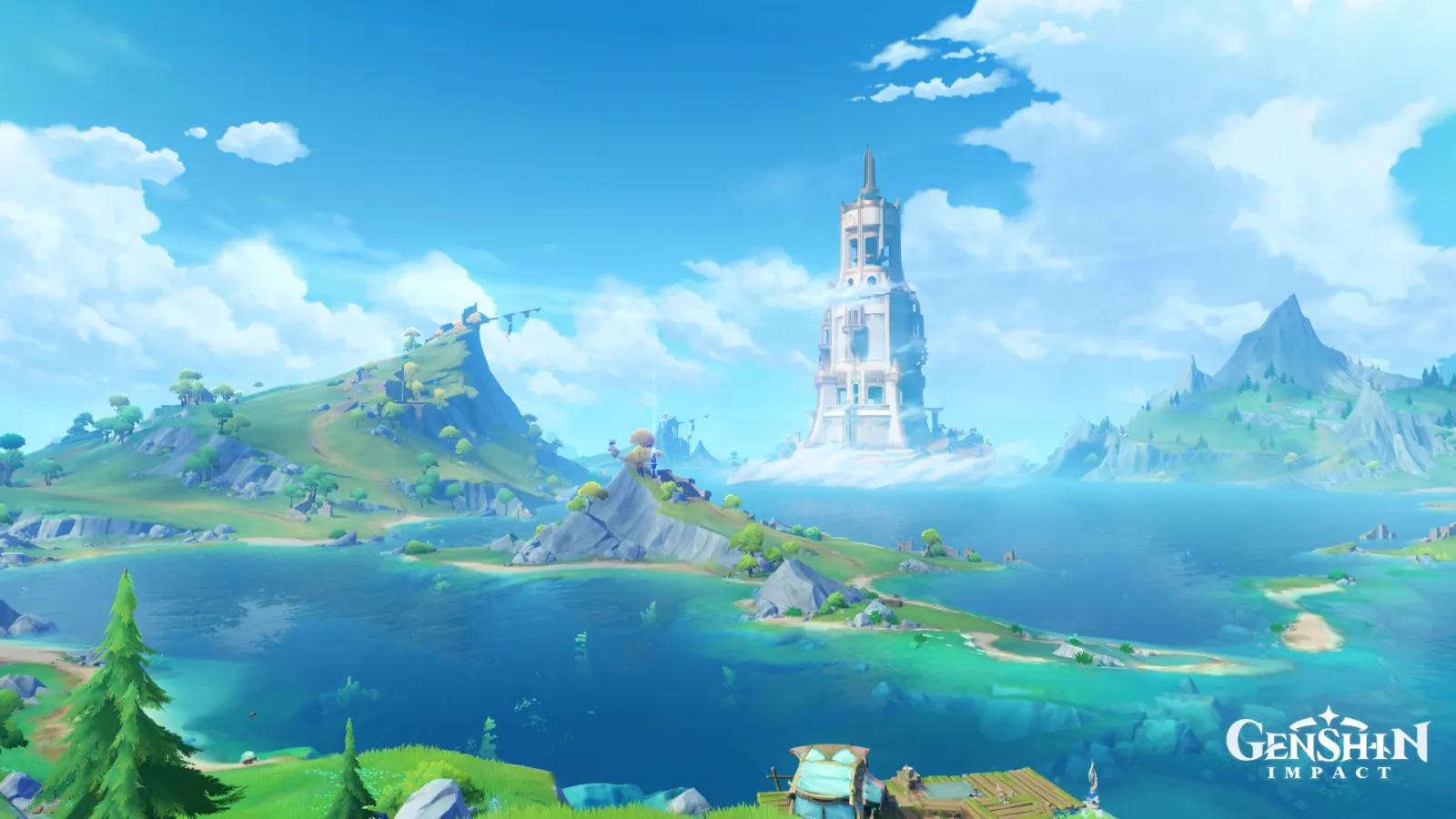
Morte Region in Sunlit Green
FontaineDayAbundantBrightHigh Summer

Morte Region in Sunlit Green

Palette

Click a swatch to copy its HEX; hover for the OKLCH value.

Reconstructed gradient

The gradient distilled from the scene, unrolled left to right by stop; the authored angle is 180° (used by the hero and exports), while gallery cards share a uniform 135° sweep.

0%3598d622%8ed2f442%b4e3f968%338faf86%389773100%519a52

Why it works

Raising the ceiling and raising the intensity are two different jobs. Morte is 80.12% blue, yet the frame's chroma peak of 0.200 is held by a green that covers only 7.50% of it — 3999 of the 4000 most saturated pixels fall in 120°–150°, and the most saturated point sits at (0.24, 0.96), the grass bank right at your feet. It pushes the ceiling to the highest of the three Fontaine regions, while the median chroma is 0.091, a further 0.002 below Belleau (0.093), which has almost no green at all. A single most-saturated point needs only a small patch, and that patch is free to fall outside the dominant family.

01

The peak is at your feet, not in the sky

3999 of the 4000 most saturated pixels fall in 120°–150°, averaging L 0.73 / chroma 0.182 / hue 139°, with the peak point at (0.24, 0.96) — the very bottom edge of the frame, the grass bank at the viewer's feet. Take the bottom strip, 12% tall and 62% of the width from the left, counting only pixels in 90°–165°: 32528 of them, averaging L 0.62 / chroma 0.128 / hue 144°, peaking at 0.200. In the same picture the zenith reaches only 0.129, the middle-distance lake 0.097, and the mist around the farthest white tower 0.057. The single fir in the lower-left corner has already retreated to 165° / 0.105 — green is reserved for the nearest layer. Chroma rising with nearness is why this frame feels like standing on the shore rather than looking through a window.

02

7.50% is enough to lift the ceiling

The blue band covers 80.12% at an average chroma of 0.089 and peaks at only 0.158 — the family holding four fifths of the area never reaches the frame's ceiling. What pushes it to 0.200 is a green covering under a tenth. And the median chroma is 0.091, just 0.002 from Belleau, which has almost no green: this patch made the picture no denser at all. Frost Moon in Earthshine is the other half of the same rule — there the single warm patch measures chroma 0.063, below the cool blue beside it at 0.072, and relies purely on sitting outside the dominant family. Together they say one thing: changing the ceiling takes only a small patch, and the cheapest way to do it is to let that patch leave the dominant family. Saturating everything buys intensity, not focus.

03

Cmax is a point; the median is an area

The chroma p99 of the three Fontaine regions almost coincide — Belleau 0.164, Morte 0.163, Liffey 0.160, a spread of 0.004 — and their median lightness is nearly identical too, 0.78 / 0.74 / 0.74. Yet Cmax runs 0.175 / 0.200 / 0.198 and the median runs 0.093 / 0.091 / 0.121: Morte has the highest peak and the lowest median, Liffey the reverse. Treat the two numbers as one and you will saturate the whole frame when all you wanted was a single bright point, and end up with a picture like Liffey's — colour everywhere, nowhere most intense. Decide who gets the ceiling first, then decide how much area is allowed to reach it.

Take these colours with you

CSS variables, a Tailwind v4 theme or SVG — one click to copy into your project.

/* Morte Region in Sunlit Green · Morte Region in Sunlit Green — Teyvat Palette */
:root {
  --zenith-blue: oklch(0.65 0.129 241); /* Zenith Blue #3598d6 */
  --cumulus-pale: oklch(0.83 0.084 231); /* Cumulus Pale #8ed2f4 */
  --tower-mist: oklch(0.89 0.057 229); /* Tower Mist #b4e3f9 */
  --lake-blue: oklch(0.61 0.097 225); /* Lake Blue #338faf */
  --fir-teal: oklch(0.61 0.105 165); /* Fir Teal #389773 */
  --bank-emerald: oklch(0.62 0.128 144); /* Bank Emerald #519a52 */
  --gradient-morte-region: linear-gradient(180deg, oklch(0.65 0.129 241) 0%, oklch(0.83 0.084 231) 22%, oklch(0.89 0.057 229) 42%, oklch(0.61 0.097 225) 68%, oklch(0.61 0.105 165) 86%, oklch(0.62 0.128 144) 100%);
}

A 1080×1350 PNG carrying the scene, its palette and every value — save it and post it as is.