Teyvat PaletteTeyvat colour cards
Scene library
GitHub
Gallery
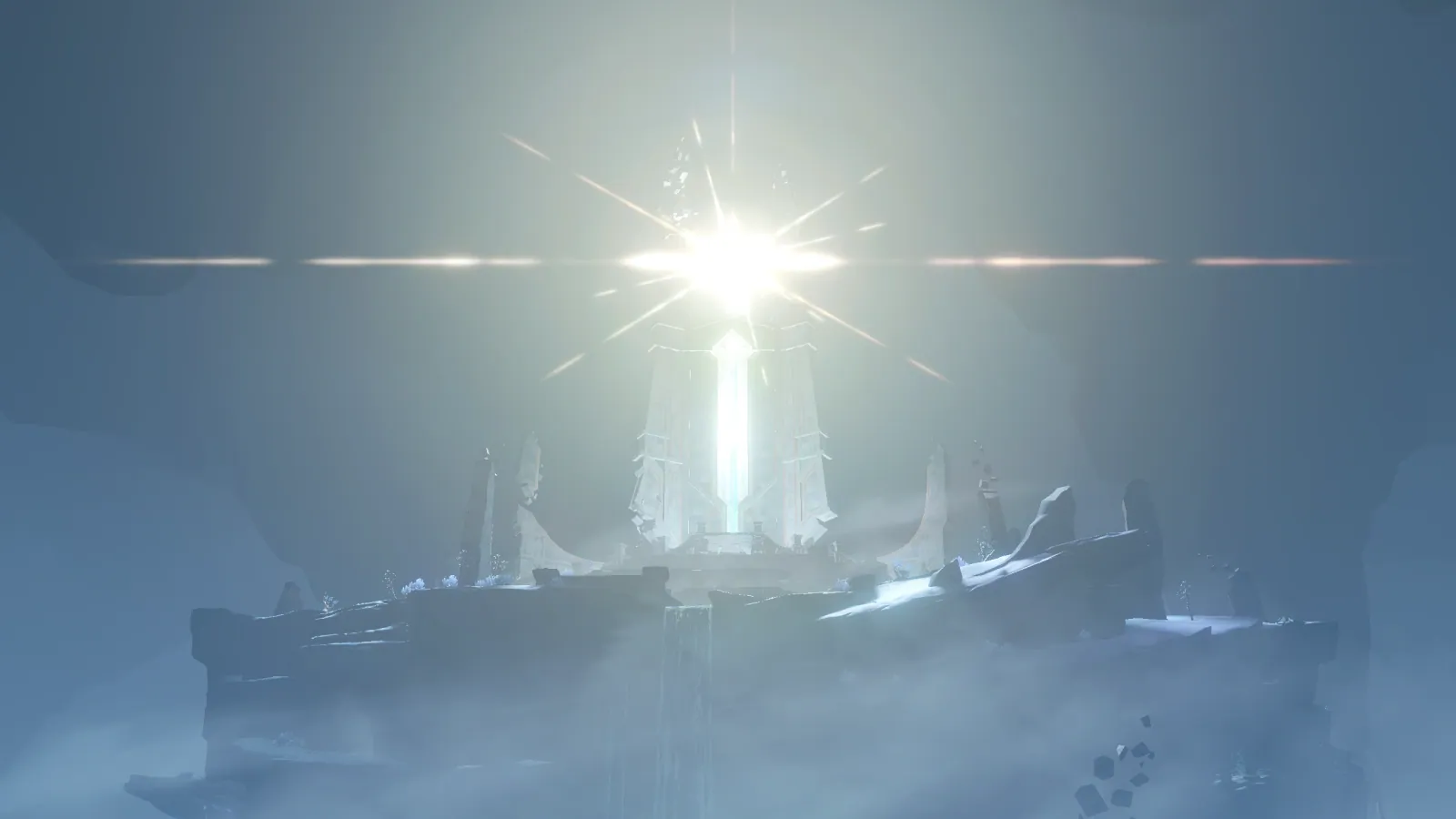
Dainichi Mikoshi in White Glare
InazumaSolemnBlindingVacant

Dainichi Mikoshi in White Glare

Palette

Click a swatch to copy its HEX; hover for the OKLCH value.

Reconstructed gradient

The gradient distilled from the scene, unrolled left to right by stop; the authored angle is 180° (used by the hero and exports), while gallery cards share a uniform 135° sweep.

0%fefbf822%bdbbb245%a1aeaa72%607582100%607e99

Why it works

A fog's chroma gradient is ordered around the light source, not around the eye. Walking outward from the false sun, lightness falls all the way from 0.99 to 0.46 while chroma runs the other way, from 0.005 up to 0.058, and hue rotates from 60° to 247°. The Nostoi Region study reads the same kind of fog and finds it brighter with distance (0.72 → 0.87) and paler with distance (0.106 → 0.079) — the two studies carry opposite signs because the variable doing the sorting has been swapped.

01

No colour at the brightest place, the richest colour furthest from the light

Of the brightest 4000 pixels, 3422 crowd onto the false sun at (0.50, 0.32) at L 1.00 and chroma 0.000 — burnt to white with no hue left at all. The most saturated 4000 all land in 240°–270°, averaging L 0.60, chroma 0.067, hue 250°, positioned at (0.23, 0.84): the mist in the lower-left corner, the place furthest from the sun. The frame's chroma ceiling is only 0.077, and every last unit of that budget is spent where the light cannot reach. To make a source genuinely blinding, do not add chroma to it — hand the chroma to what it fails to illuminate.

02

One stone, coloured by its distance from the light

The ruin's stonework straddles the whole ladder: the spire nearest the sun at L 0.88, chroma 0.021, hue 205°; the platform to its right at 0.74, 0.030, 229°; the ledge at lower left at 0.56, 0.046, 245° — one building, one stone, and it grows darker, richer and bluer the further out it goes. The mist between follows the same path: 0.74, 0.016, 173° and 0.71, 0.014, 189° to either side of the sun; 0.55, 0.032, 237° a ring further out; 0.46, 0.045, 243° and 0.58, 0.054, 247° in the corners. Nostoi Region's two gradients — brighter with distance, paler with distance — were measuring distance from the eye; here we are measuring distance from the light, so both invert. When you build a glow, do not only pull lightness down: let chroma rise against it, and the fog acquires thickness.

03

The light crossing the frame is white, not orange

The eye reports an orange flare running clean across the frame. Measured: pixels whose hue falls in 330°–90° total 123 in the whole picture, averaging chroma 0.027, and 69 of them crowd into the right half of the streak (L 0.77, chroma 0.026, hue 7°) while the left half holds none at all. What makes the streak work is lightness — the band itself on the left measures L 0.64, chroma 0.016, hue 222°, against neighbouring mist directly above and below at 0.54, 0.034, 237° and 0.56, 0.038, 240°: brighter by 0.08 to 0.10, with half the chroma left. Even this light, which belongs to the lens rather than to the world, obeys the same rule. Before drawing a strong light, decide whether it should be taking lightness or chroma. Take both and it becomes paint.

Take these colours with you

CSS variables, a Tailwind v4 theme or SVG — one click to copy into your project.

/* Dainichi Mikoshi in White Glare · Dainichi Mikoshi in White Glare — Teyvat Palette */
:root {
  --false-sun-core: oklch(0.99 0.005 60); /* False Sun White #fefbf8 */
  --lens-streak: oklch(0.79 0.012 96); /* Streak White #bdbbb2 */
  --spire-stone: oklch(0.88 0.021 205); /* Spire Stone #c8dcde */
  --halo-mist: oklch(0.74 0.016 173); /* Halo Mist #a1aeaa */
  --far-mist: oklch(0.55 0.032 237); /* Far Mist #607582 */
  --corner-blue: oklch(0.58 0.054 247); /* Corner Blue #607e99 */
  --gradient-dainichi-mikoshi: linear-gradient(180deg, oklch(0.99 0.005 60) 0%, oklch(0.79 0.012 96) 22%, oklch(0.74 0.016 173) 45%, oklch(0.55 0.032 237) 72%, oklch(0.58 0.054 247) 100%);
}

A 1080×1350 PNG carrying the scene, its palette and every value — save it and post it as is.